Even some operators believe Tier 1 backlinks can't be automated. They can — when you point GSA SER at the right targets, dial back the volume, and treat every submission like it has to pass a human reviewer. The targets that make this safe are pages with low outbound link counts on already-indexed, decent-authority root domains. That's exactly what the LOW OBL folder in SER Verified Lists exists to deliver.
This guide is the exact configuration we run on our own money sites in 2026. Current captcha stack, current AI content models, current anchor-text math. No "blast a million links a day" tactics from 2018. Just the settings that produce verified, indexable Tier 1 links a human reviewer signs off on.
Why GSA SER Still Works for Tier 1 Links in 2026
Most SEO tools age badly. GSA SER hasn't, because it isn't tied to a single platform or technique. It's a generalist that adapts to whatever CMS, captcha type, and form structure the target throws at it. That flexibility is why it's still in our daily stack thirteen years after we started using it.
What GSA SER can post to when configured for quality:
- Articles and Web 2.0 properties
- Document sharing sites
- Forums and microblogs
- Niche-relevant directories
- Wiki platforms
- Social bookmarking sites
- Social networks with CMS-style posting
- Video sharing sites with profile pages
- SerNuke-compatible engines (optional)
Notice what's missing from that list: blog comments and guestbooks. Both exist in the engine but neither belongs in a Tier 1 build. Quality engines only.
One quick note on the SerNuke line: our verified lists already include high-quality SerNuke-compatible targets, but the SerNuke engine pack itself is a separate one-time-fee add-on you buy directly from the developer. Optional — your project will still build perfectly good Tier 1 links without it. Worth it if you want to expand your engine coverage long-term.
In 2026 these contextual platforms do double duty. They feed classic Google rankings and they feed the citation signals that LLMs (Google AIO, ChatGPT search, Perplexity) use to decide which sources to surface in AI answers. A well-built Tier 1 backlink profile is now infrastructure for both ranking systems at once.
What Makes the LOW OBL Folder Tier-1-Safe
The output of any GSA SER campaign is only as good as the targets you load. Public lists are burned the moment they're shared. Scraping clean targets yourself in 2026 means paying for proxies, captcha solves, and your own time, which usually adds up to more than just buying a vetted list.
The LOW OBL folder inside SER Verified Lists is a curated subset where every target page meets these criteria:
- PA / DA 15+ — the root domain has real authority, not a fresh PBN signature.
- Outbound links under 50 per page — your link doesn't dilute into a wall of spam.
- Contextual placement — articles, document shares, Web 2.0s, not throwaway profile pages.
- Root domain indexed in Google — we scrape from Google directly, so every domain is already live in the index.
- Cross-validated against Yandex, Majestic, and our own footprint filters before the URL reaches your folder.
That's the difference between a Tier 1 backlink and a Tier 3 throwaway. The targets in this folder are clean enough to point at a money site or use through a buffer property. Either approach is defensible.
Both work. We point LOW OBL links directly at money-site pages on lower-competition keywords and use buffers (Web 2.0s, guest posts, niche edits) on more competitive terms or thinner-content pages.
If you're working on a brand-new website — or you're new to GSA SER yourself — always build buffer properties first. A young domain has no trust to absorb sudden link velocity, and a new operator hasn't had time to calibrate the dials yet. Buffers give both the site and the operator some breathing room. Point Tier 1 at the buffer, let the buffer pass equity to the money site, and adjust as you watch what survives review.
Prerequisite: SERVL Sync Must Be Running First
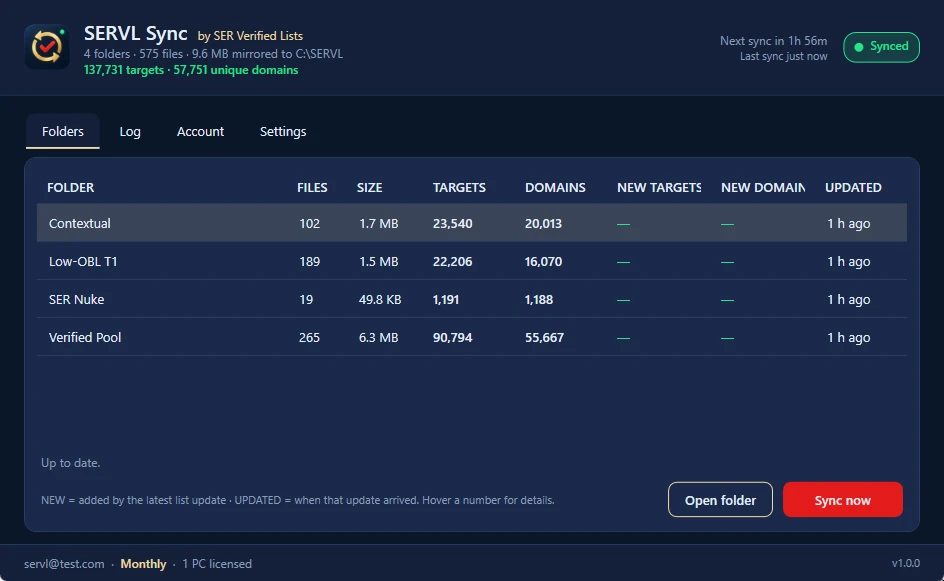
This guide assumes you've already installed SERVL Sync and pointed GSA SER's site lists at its folders, so verified targets are refreshing on your machine every two hours. If you haven't done that yet, set it up first. Nothing below works without it.
Once SERVL Sync shows the four folders as synced, you're ready for the configuration below.
The 8-Step LOW OBL Configuration
Each step assumes you've opened the project you want to configure in GSA SER. Apply settings at the project level, not globally, so different projects can run different profiles.
Point the Project at the LOW OBL Folder Only
Open your project → Options tab → scroll to Global Site List Usage. Tick "Use URLs from Global Site Lists if enabled", then click User Define and select the Low-OBL T1 folder from your synced SER Verified Lists. Nothing else.
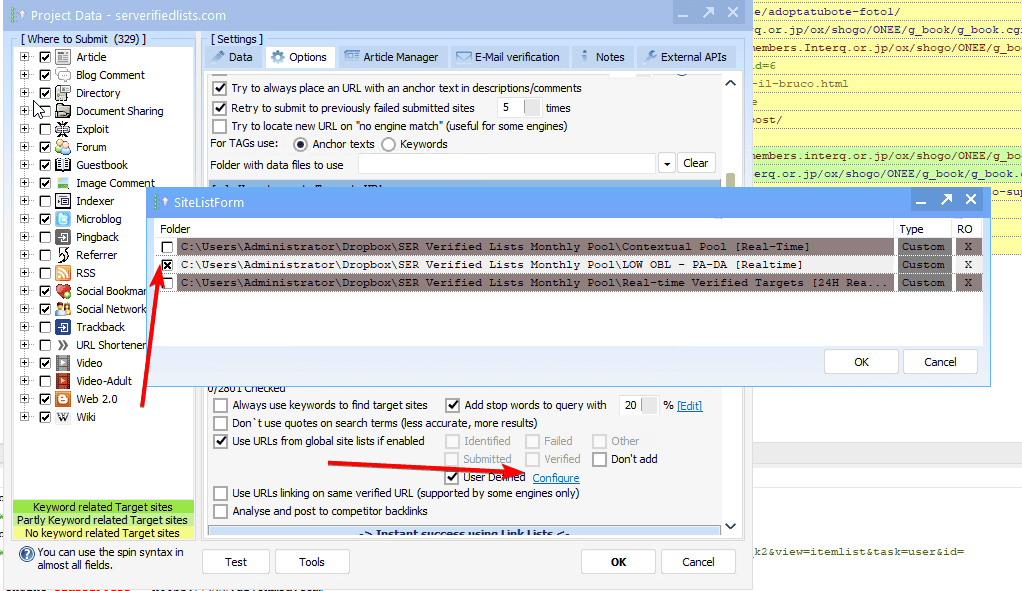
Restricting this to one folder is the entire point of the playbook. Only clean, contextual, indexed targets with low outbound link counts get posted to. Mixing in the general verified list defeats the purpose.
Disable Search Engine Scraping Completely
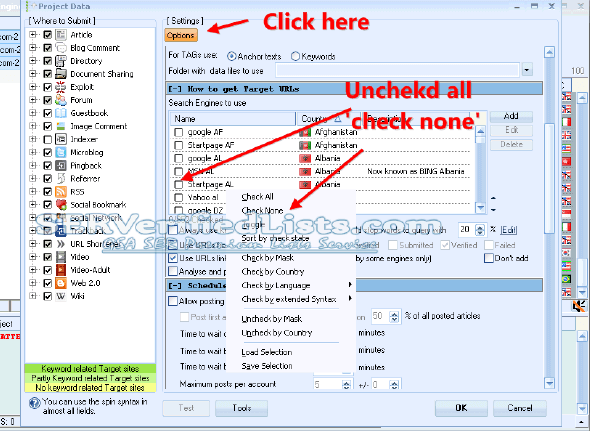
In the project → Search Engines to Use → right-click → Check None. Every engine should be unchecked.
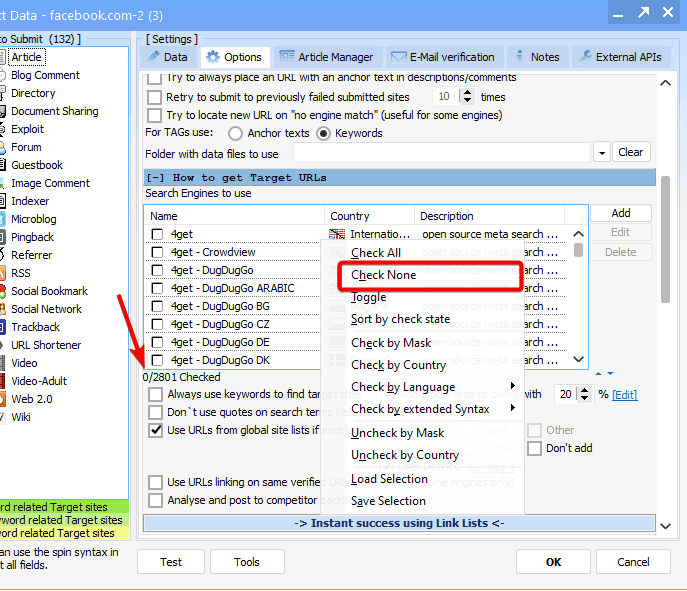
If even one search engine stays ticked, SER will start scraping live results and feeding spammy, footprint-detectable URLs into the same project. You've already paid for clean targets. Don't pollute the pool.
Enable Only Contextual Engines
Under Where to Submit, right-click → Uncheck Engines that Use No Contextual Links. Then check only the platforms that allow real article-style placements:
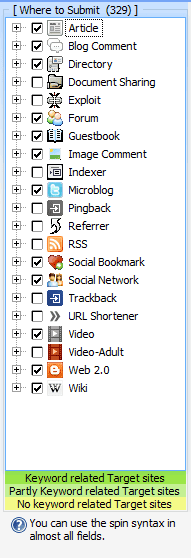
- Articles
- Directories
- Document Sharing
- Forums
- Microblogs
- Social Bookmarks
- Social Networks
- Wiki
- Video
- Web 2.0 (Limited)
- SerNuke engines (if you've added them — optional)
Contextual placements blend into real article bodies, which is what makes them survive manual review and pass link equity properly. Profile pages and guestbook entries do neither.
Even if you accidentally tick a few kitchen-sink engines that wouldn't normally suit Tier 1, it doesn't matter here. Your project is locked to the LOW OBL folder (Step 1) and search engines are off (Step 2), so SER can only post to targets that already exist in the folder. The unsuitable engines simply won't fire because there are no matching URLs to feed them. Belt and braces.
Build a Brand-Heavy Anchor Profile
The single fastest way to look unnatural at Tier 1 is exact-match anchor stuffing. Google's 2026 link-spam filters lean harder on anchor patterns than on raw link volume. The safe modern distribution:
| Anchor Type | Share | Example |
|---|---|---|
| Branded | 50–60% | YourSite, YourSite.com, Your Brand Name |
| Generic | 15–25% | read more, this guide, learn more, see here |
| Naked URLs | 10–20% | https://yoursite.com, www.yoursite.com |
| Partial / LSI | 5–10% | Partial KW1, KW2 tips, KW3 explained |
| Exact match | 1–5% | Exact KW (use sparingly) |
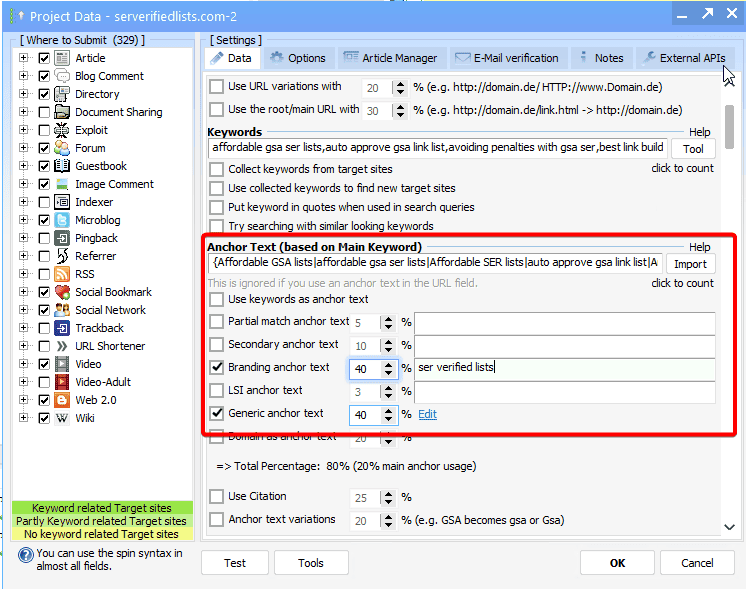
In GSA SER: project settings → enter your anchor mix in the appropriate fields (Anchor Text, Partial Match, Generic, LSI). Turn on Use LSI Anchor Text and Use Branding Anchor Text for extra variation without manually padding the lists.
These percentages are a safe starting point, not a fixed rule. The right ratio depends entirely on your current SEO situation — existing anchor cloud, niche norms, how aggressive your competitors are, and what you've already built at lower tiers. Drop two or three competing pages into Ahrefs or Majestic and look at the actual anchor distribution they've used. Match the niche, don't fight it. Branded-heavy in finance and legal, looser in lifestyle and tech.
Load Real AI Content (Plus Images, Video & Authority Links)
LOW OBL targets get reviewed by humans more often than the rest of the verified list. Spun garbage gets rejected, your campaign throws errors, and you've burned captchas and email slots for nothing. In 2026 there's no excuse. AI content is cheap enough to use at full SER scale.
What we run for content:
- DeepSeek V4 Pro — our top recommendation and daily driver. Benchmarks close to OpenAI's GPT-5.5 class but costs literal pennies per article. Highly recommended for almost any niche.
- DeepSeek Flash — even cheaper than V4 Pro, fast, and still produces clean output. Use it when you want maximum cost-efficiency on bulk Tier 1 articles.
- Claude Sonnet / Opus (Anthropic) — premium-tier writing, sometimes overkill. Worth it for high-DA targets, premium niches (finance, legal, medical), or hero pages where tone really matters. For most lifestyle / general-niche projects DeepSeek V4 Pro is already more than enough.
- OpenRouter — one API key, every modern model. Useful when you want to A/B which model writes best for your specific niche.
All four plug straight into GSA SER's built-in article generation settings (any OpenAI-compatible API), into GSA Content Generator, or into SEO Content Machine. SCM is what we use for the final layer. Its templates, macros, and spintax wrap modern AI output in the structure SER expects.
Working rules for content quality:
- 700–1,500 words per article. Longer doesn't help. Shorter gets rejected on stricter platforms.
- Three to five article variations per project so SER has something to rotate.
- Include a few good images and a YouTube embed in every article. Enable Insert Images and Insert Videos in Article Manager. Rich-media submissions read like real posts, not bot output — which is exactly what survives manual review.
- Add 1–2 outbound authority links per article — Wikipedia, a respected industry publication, a .gov or .edu source. This single move dramatically reduces the "spammy" signal and helps the article look like a normal piece of writing rather than a backlink wrapper.
- Use spintax at the sentence and paragraph level, not the word level. The "every-third-word-synonym" approach reads like 2014.
The targets in the LOW OBL folder are mostly real websites with real moderators. Your article needs to read like something a person would publish — coherent, on-topic, multimedia-rich, with sensible outbound references. Bots check the form fields. Humans approve the post. Write for the second audience and the first one takes care of itself.
Even with DeepSeek V4 Pro at the wheel, spot-check the first 20 generated articles before letting a project run unattended. If something's off (wrong tone, hallucinated facts, weird formatting) fix the prompt now, not after 10,000 submissions.
Set Up Clean Emails for Verification
Most LOW OBL targets require email verification before the link goes live. Five to ten clean inboxes per project is plenty. How you source them matters more than how many you have.
What works in 2026:
- Fresh domain + catch-all on your own host. This is the hassle-free long-term winner. Buy a fresh domain, point it at a provider that supports a wildcard catch-all inbox, and you've got unlimited email aliases that just work. Catch-all support is the must-have feature — without it you're constantly creating and managing individual inboxes, and the whole setup falls over inside a month.
- For specific provider picks we trust and the up-to-date supplier list, see our Resources guide. We keep that list current as providers come and go — worth a quick check before you commit to one.
What to avoid:
- Gmail and Yahoo accounts. They work for a small handful and they're great in theory, but in practice they're hard to keep alive long-term. Verification SMS, security challenges, account suspensions on accounts you barely use. Not cost-effective once you factor in your own time replacing them.
- Publicly sold catch-all lists. Most of those domains are already on blacklists by the time you buy them. Verification rates tank inside a week.
- The same provider across every project. That's a footprint waiting to be flagged.
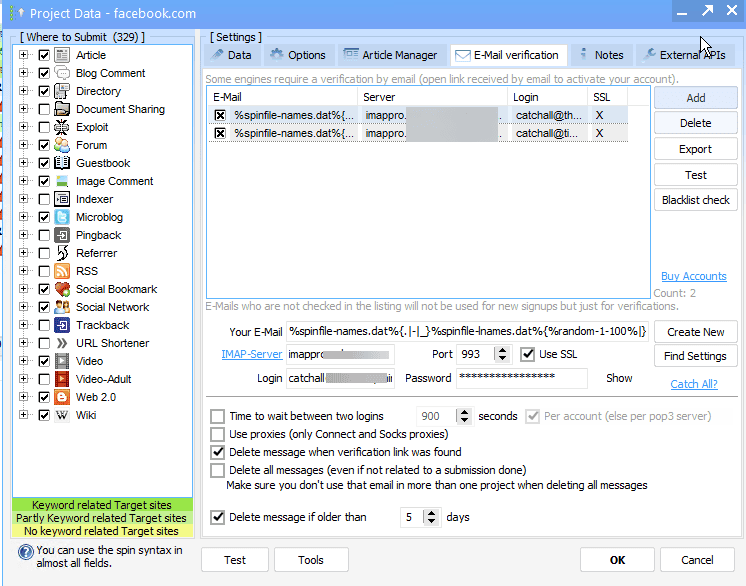
In GSA SER: project → Email Verification → Add → import your email credentials. Tick Use Only New Emails for Every Submission and Delete Messages After Verification.
Configure the 2026 Captcha Stack
Captcha success is the single biggest determinant of LpM on a LOW OBL project. The 2026 hierarchy looks like this:
| Layer | Solver | Use For |
|---|---|---|
| Primary | Xevil 7 + reCAPTCHA module | Everything. Unlimited solves once licensed. |
| Backup | CapMonster Cloud | The reCAPTCHAs Xevil misses. Hosted, no setup. |
| Tier-1 fallback | 2Captcha | Enable only for DO FOLLOW targets. Real humans, last resort. |
| Optional first-pass | GSA Captcha Breaker | Basic text/image captchas. Free first-pass filter only. |
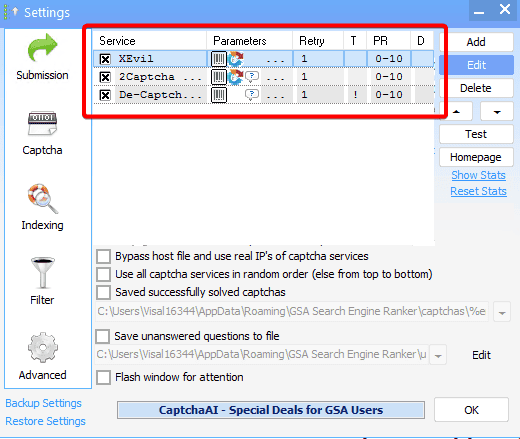
Xevil 7 needs IPv6 rotating proxies to solve reCAPTCHA cost-effectively at scale. We use Reproxy IPv6, about $8/month for 50 threads. Important: use IPv6 only for Xevil, never for GSA SER posting. Most target sites still reject IPv6 traffic, which would tank your submission rates. Keep IPv4 proxies for SER and IPv6 for Xevil. Two separate pools doing two separate jobs.
Inside GSA SER: Options → Captcha → add solvers in the priority order above → set retries to 2 or 3.
Tune Submission, Verification, and Proxies
The LOW OBL folder is a quality-over-quantity list. Run it like one: fewer aggressive settings, more patience, configured for acceptance rather than peak LpM.
| Setting | Value |
|---|---|
| HTML Timeout | 180 seconds |
| Threads per private proxy | 5–10 |
| Skip sites with OBL over | 50 |
| Avoid posting on same domain again | Enabled |
| Re-verification interval | 48 hours |
| Verified links must have exact URL | Enabled |
| Search engines | Disabled (from Step 2) |
| Private proxies for submission | Enabled |
The honest rule of thumb for dedicated or semi-dedicated private proxies: 5–10 threads per proxy is the safe working range. So if you've got 10 proxies, you can comfortably run around 100 total threads. Scale linearly from there. Push past 10 threads per proxy and you'll start seeing connection errors and IP bans — not worth it for the marginal speed gain.
You're not chasing LpM here. A campaign that produces 200 verified Tier 1 links a week from clean contextual targets will outrank one that produces 20,000 spam links a day. Less is more, and a slower pace also keeps your captcha bill in check.
LpM and VpM are NOT the metrics to monitor on a LOW OBL project. Your LpM will look low — and that's expected, not broken. The targets here are big, often registration-gated websites with email verification, posting cooldowns, and manual review queues. By design, every link takes longer to land than a Tier 3 spam target would. Watching LpM on a LOW OBL project is like measuring a fine dining restaurant by how fast it pushes orders out the kitchen. Wrong metric, wrong restaurant.
Five Habits That Keep LOW OBL Campaigns Healthy
1. Start slow, then scale based on real data
Open with a conservative thread count for your proxy pool (5–10 per proxy). Watch the verified-link count and acceptance rate for a week. Only scale up once the numbers are clean. There's no medal for hitting 30,000 submissions on day one if half never make it past review.
2. Keep your footprint deliberately messy
Use different emails across different projects, mixing your catch-all aliases with the occasional real account on stricter platforms. Mix engine types so the link mix looks like real humans building, not a script.
3. Manually spot-check submissions weekly
Open ten random verified URLs in a browser. Does the article actually appear? Does the anchor render correctly? Are the images and YouTube embed showing? If rejections climb, the usual culprits are short articles, missing media, or a blacklisted email. Fix the input, don't fight the platform.
4. Treat indexing as optional, not mandatory
LOW OBL links come from indexed root domains and tend to index naturally, especially once you point a Tier 2 link wheel at them. If you want to compress the timeline, Speedy Indexer refunds credits for any link that fails to index, so you only pay for results. Avoid mystery-box indexers. Most don't work and a few can hurt.
5. Refresh content and review targets monthly
Drop in fresh article variations every month. The LOW OBL folder itself refreshes every two hours through SERVL Sync, so as long as your project is pulling from the live folder, you're always working with current targets. Review the project's verified-link list once a month and prune obvious junk.
Need the LOW OBL Folder Itself?
This whole playbook assumes you're already pulling the LOW OBL folder from SER Verified Lists through SERVL Sync. If you aren't, that's the missing piece — pre-filtered, real-time-synced verified targets that turn this configuration into actual rankings.
Choose Your Package →Frequently Asked Questions
Can you build Tier 1 backlinks with GSA SER in 2026?
Yes. Some operators still believe Tier 1 can't be automated, but the limitation was never the tool — it was the inputs. Aim GSA SER at a pre-filtered LOW OBL target folder, run human-quality AI content with proper images and outbound authority links, keep anchors brand-heavy, and the verified links it produces are perfectly suitable for Tier 1.
What is the LOW OBL folder in SER Verified Lists?
A curated subset of our verified targets where every page has fewer than 50 outbound links and meets PA / DA 15+ authority thresholds. Because the root domains are already indexed in Google and the pages aren't saturated with outbound links, link juice passes cleanly. That makes them safe to use for Tier 1 builds straight at a money site or via buffer properties.
Is it safe to point GSA SER links directly at a money site?
From the LOW OBL folder, yes. Many operators including us do exactly that. The cautious approach — and the one we recommend if your site is brand new — is to point Tier 1 builds at buffer properties first (Web 2.0s, guest posts, niche edits) and let the buffer absorb any volatility before passing link equity to the money site.
Both approaches work. The buffer adds one layer of insulation at the cost of a slower ranking lift.
What anchor text ratio should I use for GSA SER Tier 1 links in 2026?
Lean brand-heavy. A safe modern split is roughly 50–60% branded, 15–25% generic, 10–20% naked URLs, 5–10% partial / LSI, and 1–5% exact match. These percentages are a starting point — the exact ratio depends entirely on your current SEO situation, niche norms, and what you've already built at lower tiers.
Aggressive exact-match anchors at Tier 1 are the single fastest way to look unnatural. Google's 2026 link-spam filters lean harder on anchor patterns than on raw volume.
Which captcha solver should I use for the LOW OBL folder in 2026?
Primary: Xevil 7 with the reCAPTCHA module, paired with Reproxy IPv6 rotating proxies. One-time license, unlimited solves, handles modern reCAPTCHA v2/v3 and hCaptcha.
Secondary: CapMonster Cloud as a hosted fallback for captchas Xevil misses.
Tier-1 fallback only: 2Captcha enabled for DO FOLLOW targets. Surgical use, not everyday.
Optional: GSA Captcha Breaker as a free first-pass filter for basic text and image captchas.
Do I need to manually index GSA SER Tier 1 links?
Often no. Verified links from the LOW OBL folder come from indexed root domains, so they tend to index naturally, especially once you point a Tier 2 link wheel at them.
Manual indexing is optional but useful when you want to compress the timeline. Speedy Indexer is the service we trust because it refunds credits for any link that fails to index, so you only pay for results.
How many emails do I need for a GSA SER Tier 1 project?
Five to ten clean inboxes is plenty. The hassle-free long-term setup is a fresh domain with a wildcard catch-all enabled — catch-all is the must-have feature. For current supplier picks, see our Resources guide, which we keep up to date.
Gmail and Yahoo accounts technically work but aren't cost-effective long-term — security challenges and account suspensions burn your time. Skip publicly sold catch-all lists. Most of those domains are already on blacklists.
Why disable search engine scraping when running the LOW OBL folder?
Because you've already paid for the cleanest targets. The moment you let GSA SER scrape live search results, it dilutes your project with spammed, low-OBL-failing, footprint-detectable sites that the LOW OBL folder specifically excludes.
Disable every search engine in the project so SER posts exclusively to the pre-filtered list.