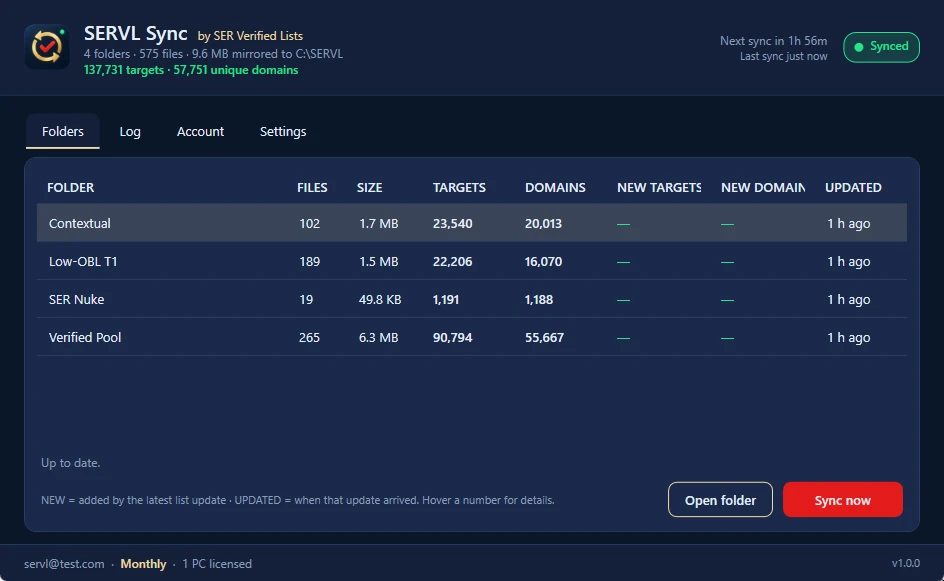
GSA Search Engine Ranker is thirteen years old and still the most capable automation tool in link building, but the settings that made it fly in 2017 are not the ones that work now. This is the configuration we run on our own servers in 2026, screen by screen. It assumes you get your targets from SER Verified Lists through SERVL Sync; if you don’t, everything still applies, you’ll just be feeding it a worse list.
What a correct setup buys you:
- GSA SER runs faster on fewer resources, because it posts instead of scraping.
- Threads go up without proxies dying, because proxies only post.
- LPM and VPM rise together, because the targets have already accepted a post.
- You stop paying for MOZ, Majestic and indexers you don’t need.
Before anything else: clear the decks
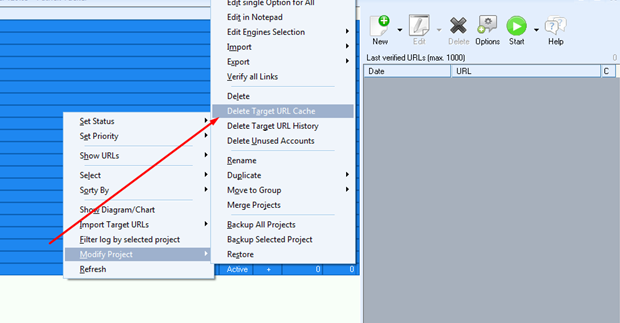
Clear the target URL cache
Select all projects, right-click → Modify project → Delete target URL cache. By default SER keeps a small, random list of targets from previous runs and starts there. You want each project to start from the list you gave it, not from leftovers.
Import fresh emails
Select all projects, right-click → Modify project → Import → Email accounts → From file / From clipboard, and accept the prompt to delete the existing accounts.
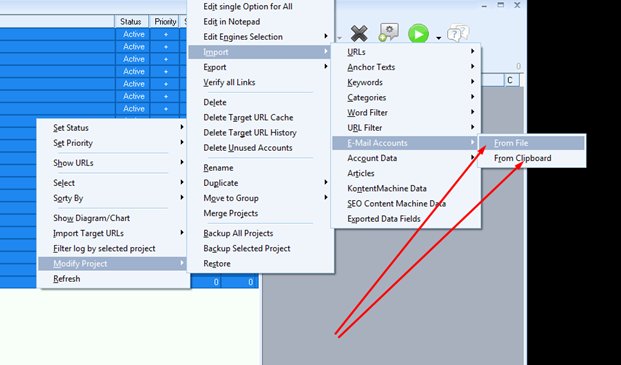
Five to ten emails per project is plenty. Hundreds per project only cost resources. In 2026 the right emails are a catch-all on a domain you own; the public “buy catch-alls” services recycle the same root domains across thousands of users and get blacklisted within days. We haven’t found a catch-all supplier we’re happy to recommend yet; when we do, members will hear about it first. Until then, a fresh domain on any wildcard-capable host does the job. If the catch-all stops receiving, nothing verifies, so this is the first thing we check on every “my VPM dropped” ticket.
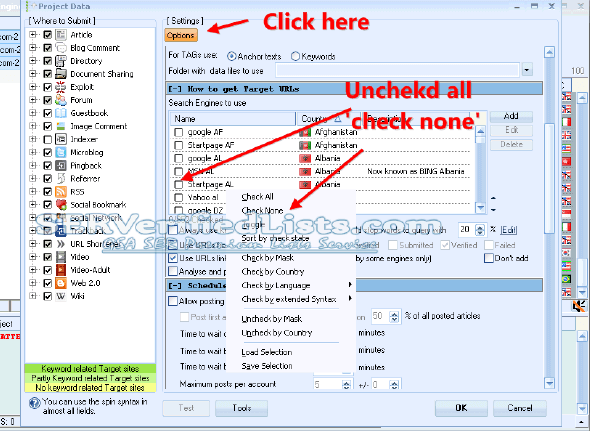
Remove every search engine
Per project: Edit → Options → Search engines to use, right-click → Check none.
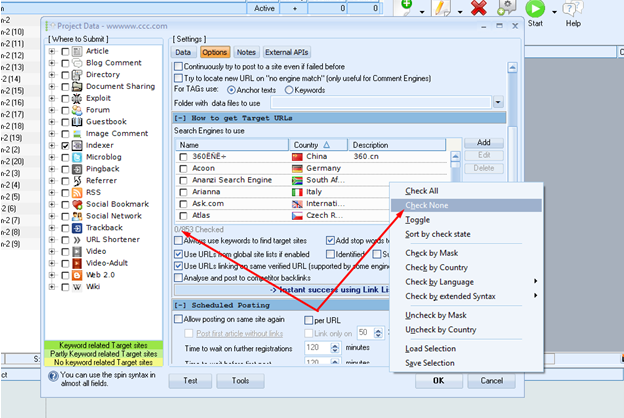
Scraping is the single biggest waste of a proxy budget. With verified folders on disk, SER never needs to scrape; every thread should be posting.
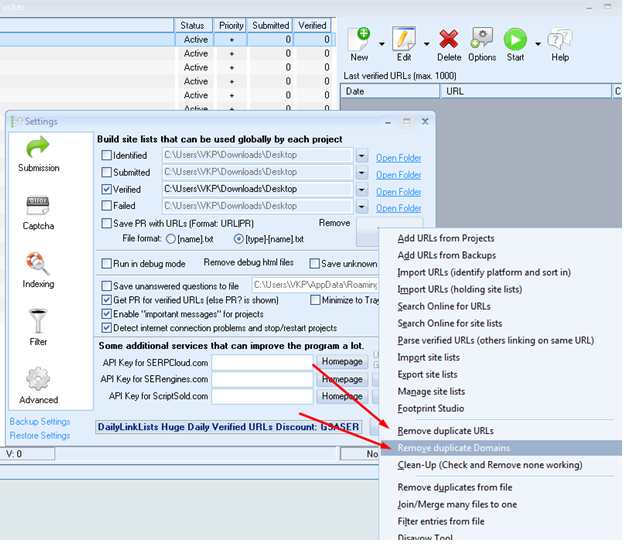
Remove duplicates weekly
Options → Advanced → Tools → Remove duplicate URLs, all four lists, then Remove duplicate domains. SERVL Sync folders are deduplicated server-side every ten minutes, but SER’s own Submitted and Verified lists still grow; clean them once a week.
Global settings
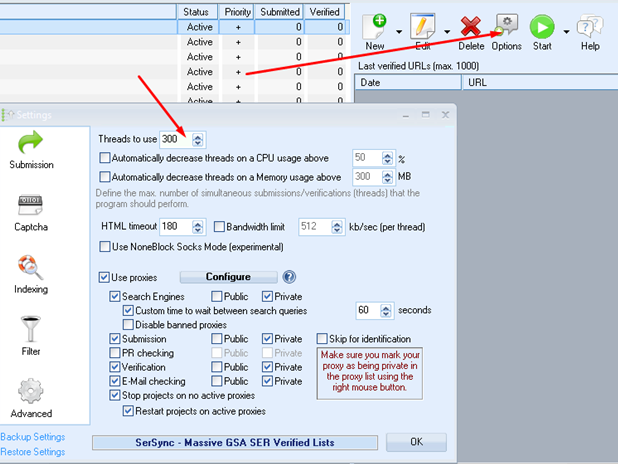
Threads
Threads are limited by two things: proxies and the box. Ten threads per posting proxy is the safe starting point; watch Task Manager while SER and your captcha solver are both running and raise it until CPU sits around 80 % or RAM headroom drops under 500 MB, then back off a notch.
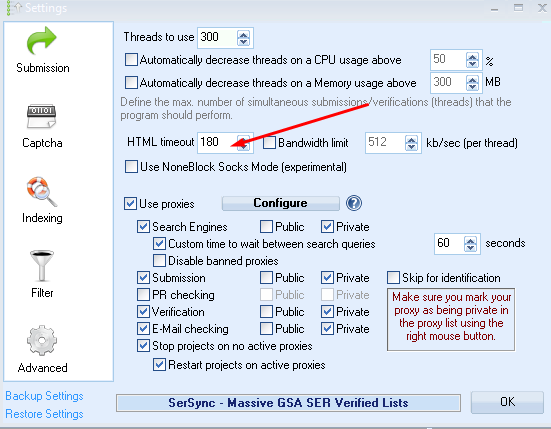
HTML timeout
Set it to 180 seconds. Some of the best contextual platforms are slow; a short timeout throws those links away to make the status bar look busier.
Proxies
Tick Use proxies under Submission, and use them for submission only. Verification doesn’t need to go through a proxy and it halves the load if it doesn’t.
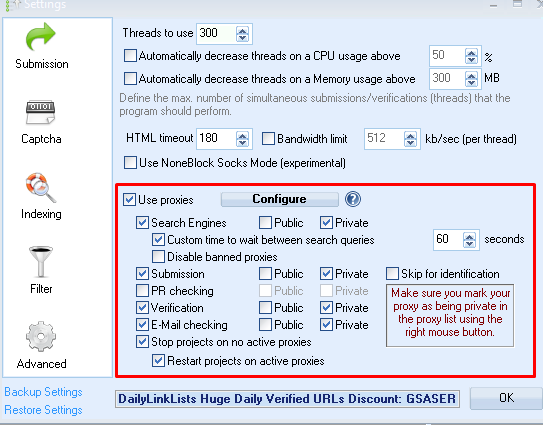
Rules that still hold:
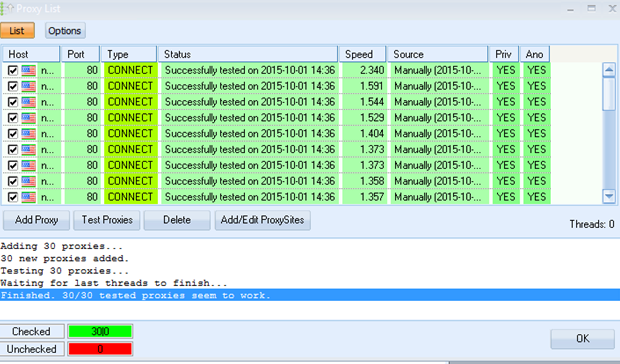
- Private IPv4 datacenter or ISP proxies for posting. Never public proxies, and tick “automatically disable public proxies”.
- Test every new batch before you trust it. A proxy that fails once is often fine ten minutes later; SER’s own tester or Scrapebox will tell you.
- IPv6 is for XEvil only. Most target sites refuse IPv6, so posting through it tanks your submission rate.
Our current picks and prices are on the resources page.
Captcha: the 2026 order
Most forms now sit behind reCAPTCHA v2/v3, hCaptcha or Cloudflare Turnstile. Old OCR can’t touch them, so the order matters:
- XEvil 7 first. One-time licence, unlimited solves. It handles everything GSA Captcha Breaker does plus the hard image and text captchas, and with the reCAPTCHA add-on it solves reCAPTCHA too. It needs a 12 GB+ box and an IPv6 rotating pool.
- A paid solver second for what XEvil misses: CapMonster Cloud for everyday fallback, 2Captcha switched on for Tier 1 / do-follow projects only, where a solve is worth a link.
- GSA Captcha Breaker as a free first pass if you already own it. Fine for the simple captchas, not a reCAPTCHA solver.
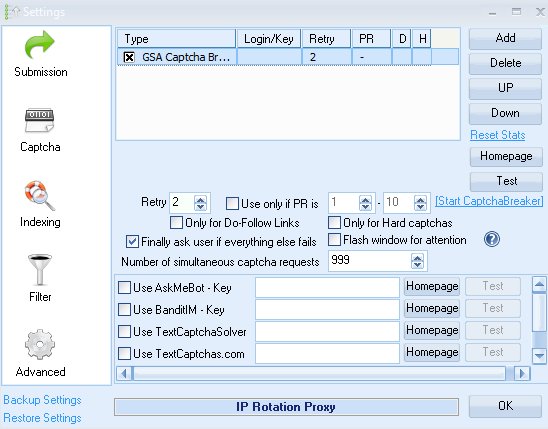
Set captcha retries to 2. Inside XEvil set its internal timeout to 120 seconds or more; inside SER start the captcha timeout low and raise it in 30-second steps while watching the captcha success rate.
Indexing
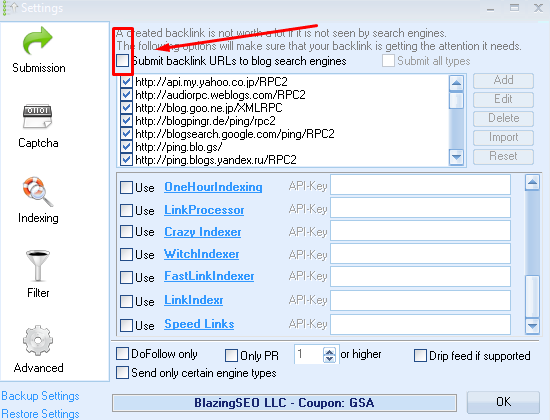
Pinging is a waste of threads. A Tier 3 run from the Verified Pool does most of the indexing work for free now. For Tier 1 contextuals you want indexed fast, use a service that refunds links that don’t index; Speedy Indexer is the one we run. Leave Send verified links to index services off in projects and feed the indexer from the verified list on your own schedule.
Filter
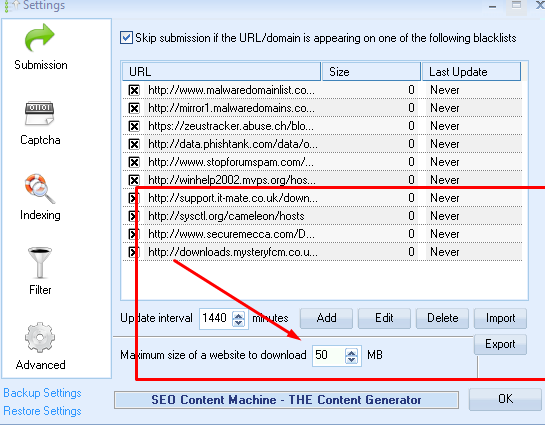
Select all platforms. Set maximum size of a website to download to 50 MB or more. Turn Skip submission on. A bigger download limit means more overhead and more good links; the filters below sort them.
Two filters do the real work in 2026: Skip sites with more than 40 outgoing links on Tier 1 projects (our Low-OBL T1 folder is already under 50, so this is belt and braces), and Avoid posting to sites with just an IP and no domain. Don’t use the PageRank filters; PR hasn’t existed for years.
Project settings
Article Manager: unique articles, no spintax
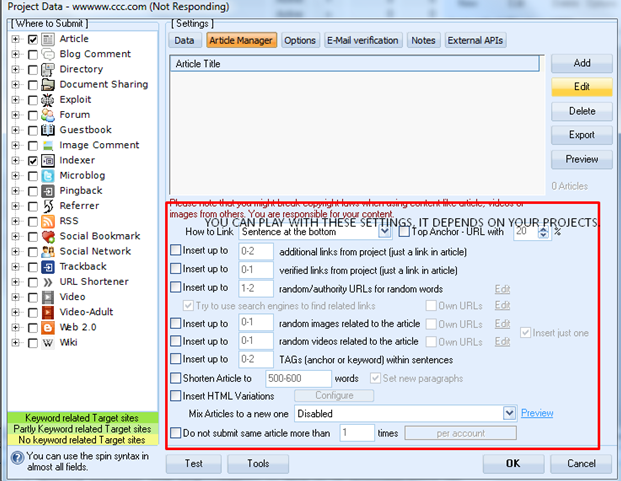
This section changed more than any other. Contextual platforms moderate now, and {this|that|the other} gets deleted before it verifies. The fix is built into SER: article generation with any OpenAI-compatible API key, one unique article per account, in every field. Put your OpenRouter, DeepSeek or Anthropic key in, pick a model, and SER writes on the fly. A thousand-word article costs a fraction of a cent on DeepSeek and a few cents on Claude.
The settings that still matter:
- How to link: sentence at random location.
- Insert 0–1 random authority URLs, up to 2 images, 1 video. Enough variation to read naturally, not enough to look generated.
- Do not shorten articles. A thousand words is the floor on contextual platforms.
- Do not submit the same article more than 1 time per account. Anything else is spam by definition.
- Skip “insert tags in sentences” and the HTML variations if your articles come from an API; they already vary.
Email settings
- 5–10 emails per project, each used in one project only, rotated at least monthly.
- Time to wait between logins: 900–1,000 seconds, so you don’t trip the provider’s login limits.
- Use proxies for emails: off.
- Delete messages after processing: on. Delete all messages: off. Delete messages older than 5 days: on.
Project data
- Use multiple URLs from the money site (or buffer) and tick Use a random URL. Links spread across the domain look natural; thirty links to one page don’t.
- URL variations 80–100 %, root URL 10–30 %.
- Site lists over keywords. If scraping is off, SER doesn’t need keywords for targets, only for anchors.
- Anchors: build the lists yourself. Branded anchors on, LSI anchors on with a real list, citation on, anchor variations 80–100 %. Leave generic, domain, partial and secondary anchors to your own lists rather than SER’s defaults. Our safe Tier 1 split is in the Tier 1 guide: roughly 50–60 % branded, 15–25 % generic, 10–20 % naked URL, the rest partial and exact.
- Fill the profile fields: random login and password, an “about yourself” in spin syntax from an original description, your Twitter and Facebook URLs, a website description, and a few website-title variations with multiple categories.
- Write your own forum comments and guestbook comments if you post to those engines at all. We don’t on Tier 1.
Project options
The ones that matter, with our values:
| Option | Our setting | Why |
|---|---|---|
| Project pause after N links/day | On, 10–20 on Tier 1, higher below | Velocity is what gets Tier 1 flagged, not totals |
| Captcha: ask all services | Important projects only | Lets the fallback solvers earn their keep where it counts |
| Verify links: exact URL, automatically | On | Anything else leaves ghosts in the verified list |
| Re-verify existing backlinks | Off | Resource-heavy, little gain |
| Send verified links to index services | Off | Index from the list on your own terms |
| Character spinning / typos | Off | Noise, no benefit |
| Try to always place a URL | On | More links per account |
| Continuously post to site even if failed | Off | Costs more than it returns |
| Tags → anchors | On | Hyperlinked tags are real links |
| Use URLs from global site lists | On, the folder for this tier | This is the whole setup: Verified Pool → T3, Contextual → T2, Low-OBL T1 → T1, SER Nuke → its own projects |
| Analyze and post to competitors’ backlinks | Off | Scraping by another name |
| Allow posting on same site again | Off on Tier 1, on below | One link per domain at the top |
| Post first article without links | On | Web 2.0s delete the account if the first post carries a link |
| Time to wait between two posts | 120 minutes | Natural spacing on multi-post platforms |
| Skip sites with more than 40 outgoing links | On for Tier 1 | OBL is the filter that protects link equity |
| PR filters | Off | PageRank is gone |
| Types of backlinks | Article, Article-Wiki, Anchor text on Tier 1 | Contextual only at the top |
| Skip no-follow | Off | A natural profile has both |
| Avoid IP-only sites | On | Always on for projects that matter |
| Keyword-presence filter | Off unless you have a big, relevant keyword list | Relevance without a good list just throws links away |
The cheat sheet
- Run it on a VPS, not your PC: 24/7, and SER is light on its own. Plan 12 GB+ RAM only if XEvil shares the box. Picks on the resources page.
- Ten threads per proxy to start; let Task Manager, not the status bar, decide the ceiling.
- Proxies for submission only; private IPv4 for posting, IPv6 only for XEvil.
- Enable important messages for projects (Options → Submission) so you see platform changes when they happen.
- Filters: OBL under 40–50 on Tier 1, skip IP-only sites, no PR filters. Too many filters and you throw away good links; too few and you keep bad ones.
- Contextual first. Fewer links, more value; let SER take the time on them.
- Captcha order: XEvil → paid fallback → Captcha Breaker. Retries 2–3.
- Dedicated emails per project, catch-all on your own domain, spam filtering off.
- Unique articles, never spintax. The single biggest fix for failed verifications.
If LPM is normal and only VPM is falling, the list isn’t the problem: check emails first, captchas second, content third. If both fall at once, check proxies. And if you’d like a second pair of eyes, @SERVerifiedListsBot on Telegram has read every ticket we’ve ever closed.